
Download Reminisce – Free Mac Journal App, Secure Diary, Easy Export
Overview
Reminisce – Journal is a lightweight, free‑of‑charge program built exclusively for macOS. Positioned in the Science & Education category with a playful “Funny Things” sub‑category, Reminisce aims to turn everyday note‑taking into a delightful memory‑keeping experience. The current stable release, version 1.4, rolled out on December 21 2016 and remains compatible with macOS X and later releases.
Although its download count is modest—only two total installs since its catalog entry—its minimalist design and zero‑cost model make it an attractive option for anyone looking for a simple, secure journaling tool without the bloat of subscription‑based services. The app’s interface is fully English‑only, but the simplicity of its layout means language barriers are minimal. In this review we’ll explore what Reminisce offers, walk through the installation process, assess system compatibility, and weigh the pros and cons so you can decide whether this free Mac journal app fits your digital diary needs.
Key Features
- Intuitive Entry Creation: Add new journal entries with a single click. The editor supports rich‑text formatting, bullet lists, and quick date stamping.
- Secure Local Storage: All entries are saved locally on your Mac, ensuring that your personal thoughts never leave your device unless you explicitly export them.
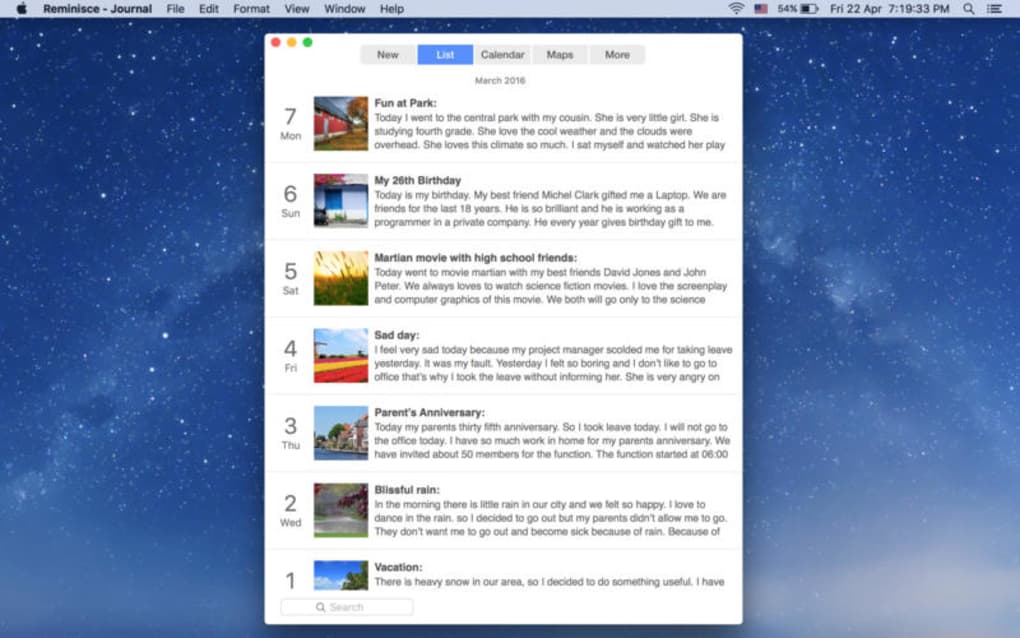
- Tagging & Search: Organise memories with custom tags and retrieve past entries instantly using the built‑in search engine.
- Export Options: Export individual entries or entire journals as PDF, TXT, or RTF files for backup or printing.
- Dark Mode Support: Seamlessly switch to macOS dark mode for comfortable night‑time writing.
- Auto‑Save Functionality: Never lose work; the app saves changes automatically every few seconds.
- Simple Backup Reminder: Periodic prompts encourage you to back up your journal to an external drive or cloud service of your choice.
- Customizable Themes: Choose from a handful of colour palettes to personalize the look and feel of the journal.
Installation & First‑Run Guide
Step‑by‑Step Download
1. Visit the official Reminisce download page (a direct .dmg link is provided on the developer’s website).
2. Click the “Download Free” button; the file size is modest, typically under 30 MB, so the download completes quickly on most broadband connections.
3. Once the .dmg file appears in your Downloads folder, double‑click it to mount the disk image.
Installation Process
4. Drag the Reminisce icon into the Applications folder shortcut that appears inside the mounted image. macOS may request your administrator password; this is a standard security check for any new application.
5. After the copy finishes, eject the disk image by right‑clicking it and selecting “Eject.”
6.
Locate Reminisce in the Applications folder and double‑click to launch. The first time you open the app, macOS will display a warning that the software was downloaded from the internet. Click “Open” to proceed.
Initial Configuration
Upon launch, Reminisce presents a brief welcome wizard that asks you to set a default storage location (your Documents folder is recommended) and optionally enable automatic backups to a folder of your choice. You can also pick a theme and decide whether the app should start automatically at login. All settings are saved in a hidden preferences file, so you can tweak them later via the “Preferences” menu.
First Journal Entry
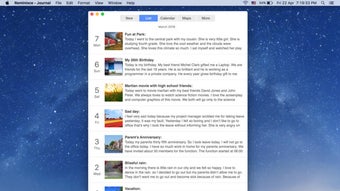
To create your first entry, click the “New Entry” button in the toolbar. The editor opens with the current date already inserted. Type your thoughts, add tags using the “#” symbol (e.g., #travel, #gratitude), and watch the auto‑save indicator flash briefly to confirm the entry has been stored. When you’re done, close the window; the entry remains in your journal list, ready for future searching or exporting.
Compatibility, Pros & Cons
Reminisce is designed exclusively for macOS. The minimum supported version is macOS X (10.10) and it runs smoothly on newer releases such as macOS Big Sur, Monterey, and Ventura. Because the app relies on native Apple frameworks, there is no Windows, Linux, Android, or iOS version at this time.
Pros
- Completely free: No hidden fees, subscriptions, or in‑app purchases.
- Lightweight footprint: Uses minimal system resources, making it ideal for older Macs.
- Privacy‑first design: All data stays on your device unless you choose to export.
- Simple UI: The uncluttered interface reduces distractions and speeds up entry creation.
- Export flexibility: Multiple file formats for archiving or sharing.
- Dark mode & themes: Visual customization improves readability in various lighting conditions.
Cons
- No cloud sync: Users who need automatic cross‑device synchronization must rely on manual backups.
- Limited language support: The UI is English‑only, which may deter non‑English speakers.
- Feature set is basic: Advanced journaling tools such as mood tracking, audio notes, or encryption are absent.
- Lack of official mobile companion: No iOS or Android app to capture thoughts on the go.
- Update history stalled: The last release was in 2016, raising concerns about long‑term maintenance.
Reviewer Verdict: Reminisce delivers a solid, no‑frills journaling experience for Mac users who prioritize privacy and simplicity over flashy features. While the lack of cloud sync and modern updates may be a drawback for power users, the app’s zero‑cost model and straightforward design make it a worthwhile addition to any macOS toolkit.
Frequently Asked Questions & Final Verdict
Is Reminisce really free, or are there hidden costs?
Reminisce is 100 % free. There are no hidden fees, subscriptions, or in‑app purchases. All core features—including entry creation, tagging, and exporting—are available without payment.
Can I sync my journal across multiple Macs?
Reminisce does not include built‑in cloud sync. To share a journal between machines, you must manually copy the journal file (found in your Documents folder) to each Mac or use a third‑party cloud service like iCloud Drive or Dropbox.
Is my data encrypted or password‑protected?
Reminisce stores entries locally without encryption. If you need additional security, you can place the journal folder inside an encrypted disk image or use macOS FileVault to protect the entire drive.
Will the app run on macOS Ventura?
Yes. The last official update (v1.4) supports macOS X and later, which includes Ventura. Users have reported stable performance on Ventura, Monterey, and Big Sur.
How do I export my journal for backup?
Open the journal, select “File → Export,” and choose PDF, TXT, or RTF. You can export a single entry or the entire collection. Save the exported file to an external drive or cloud storage for long‑term backup.
Final Verdict & Call to Action: If you’re a macOS user seeking a straightforward, privacy‑first journal without the distraction of subscription models, Reminisce is a solid choice. Its free price tag, simple UI, and reliable export options outweigh the absence of cloud sync and modern feature expansions. Download Reminisce today, start capturing your memories, and enjoy a calm, focused journaling environment on your Mac. Click the link below to begin your free download and experience the simplicity of Reminisce for yourself.







